
PROJECT: gAIa
YEAR: 2025
NATURE: Academic
UNIVERSITY: IAAC
COURSE: AI Design Studio
TEAM: Andres Espinoza, Cesar Herbosa, Joaquín Broquedis, Aymeric Brouez
GRADE: 9.5/10
The brief for this studio was to prototype an AI-assisted, agentic design companion that helps architects make better early-stage decisions—by understanding the design space, translating intent into measurable goals, and providing contextual feedback while design options are still fluid.
In this context, gAIa focuses on bringing environmental performance into the moment of decision-making. It supports architects in the early design stages with real-time sustainability feedback, so key choices (form, envelope, material systems) are guided by measurable impact rather than only intuition or precedent. To keep this feedback fast enough for iterative design, gAIa relies on a machine-learning prediction model trained on a dataset of simulated design variants, providing near-instant estimates of energy and carbon performance without running heavy simulations at every step.
The prototype is integrated into Rhino through a conversational interface (LLM-powered) and a data dashboard, allowing designers to ask questions, request changes, and compare iterations while tracking KPIs such as GWP and carbon/energy-related metrics.

PROBLEM DEFINITION
The early design stage has the biggest influence on environmental impact, but it’s also when data is limited, feedback is slow, and uncertainty is high. As a result, key choices (form, materials, envelope strategies) are often made using intuition or precedent rather than measurable performance.
Existing simulation workflows can be fragmented or technically heavy, and sustainability data often arrives too late—after schematic design—when important decisions are already locked in.
What’s missing is a way to bring performance feedback into the moment that impactful early design decisions are being made—this is the gap gAIa is built to fill.

THE SOLUTION: LET'S MEET gAIa

USER INTERFACE
CHAT TAB
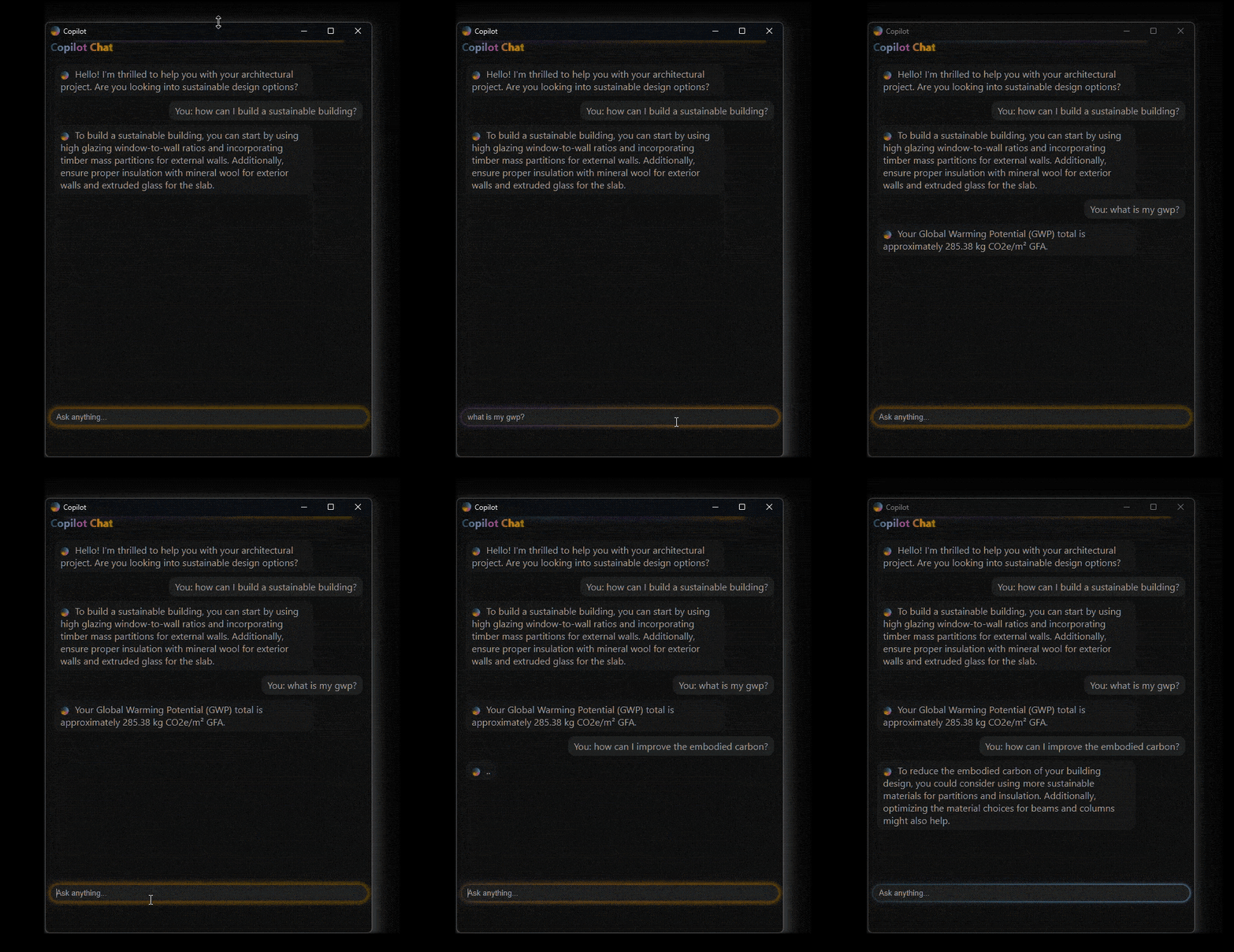
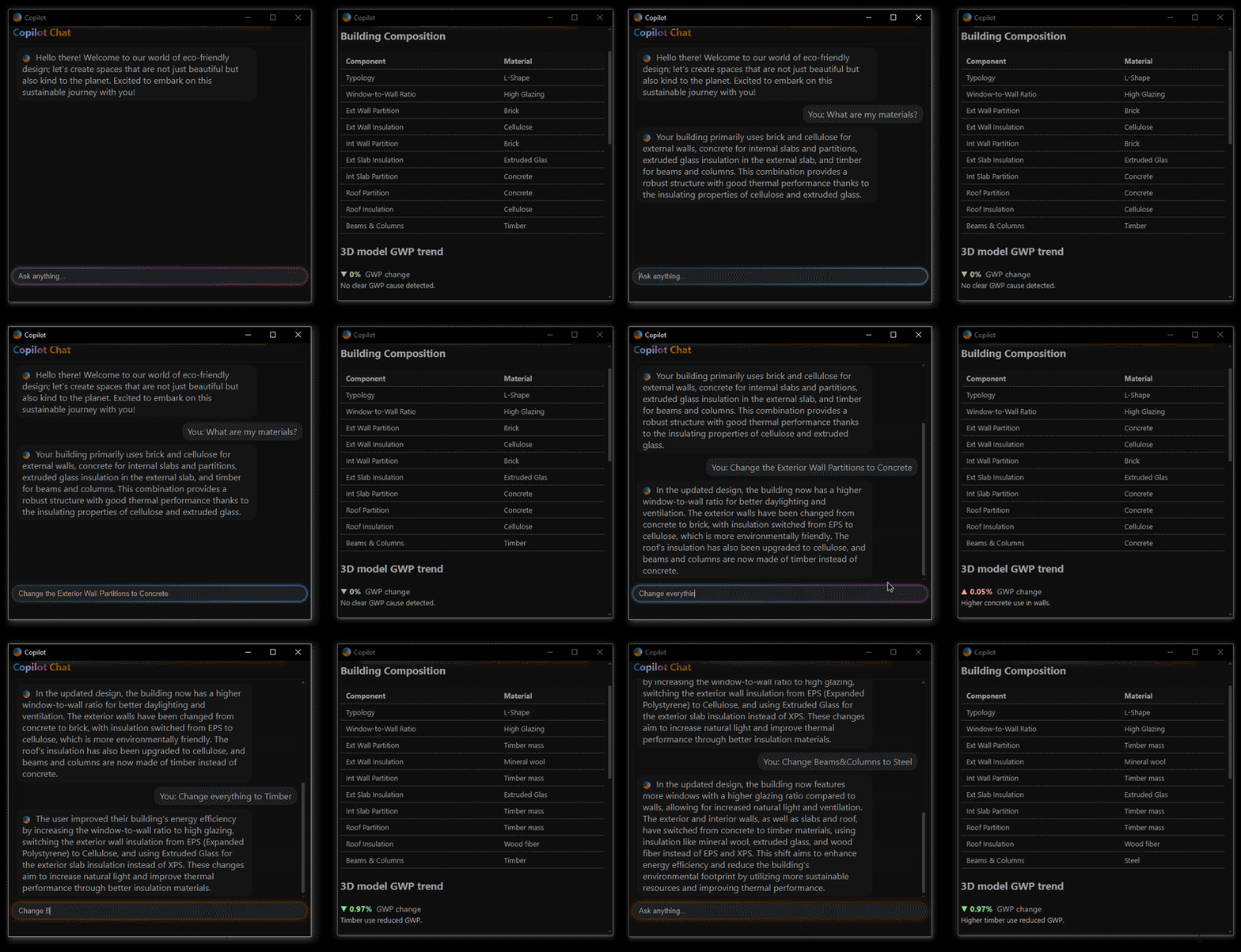
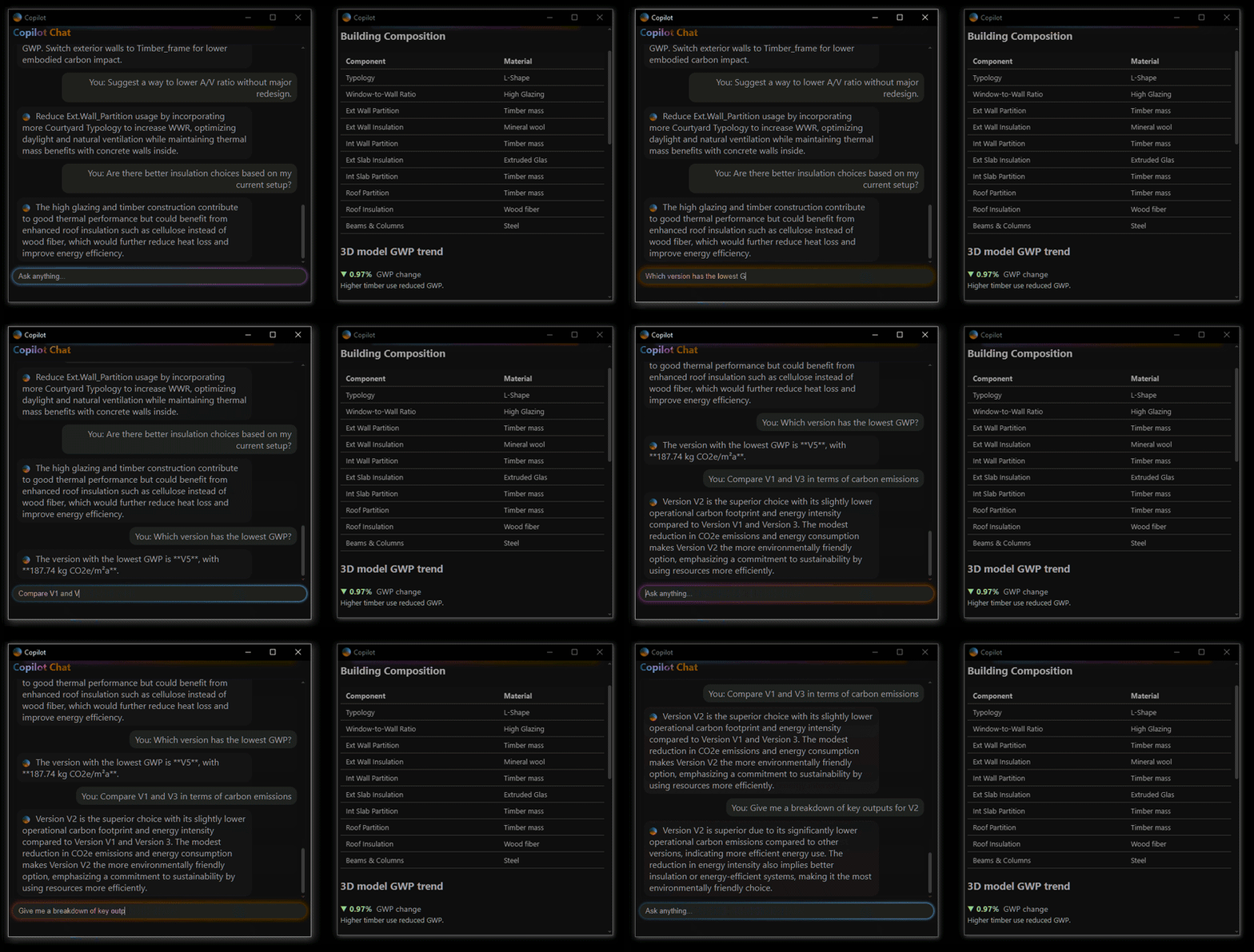
The Chat Tab in Gaia serves as the primary interface between the designer and the system’s underlying intelligence. Powered by a Large Language Model (LLM), it allows users to communicate with Gaia using plain language, no scripting or technical commands required.
Users can:
1) Ask direct questions (e.g., “What is the embodied carbon of this version?”)
2) Request changes (e.g., “Switch roof insulation to cork”)
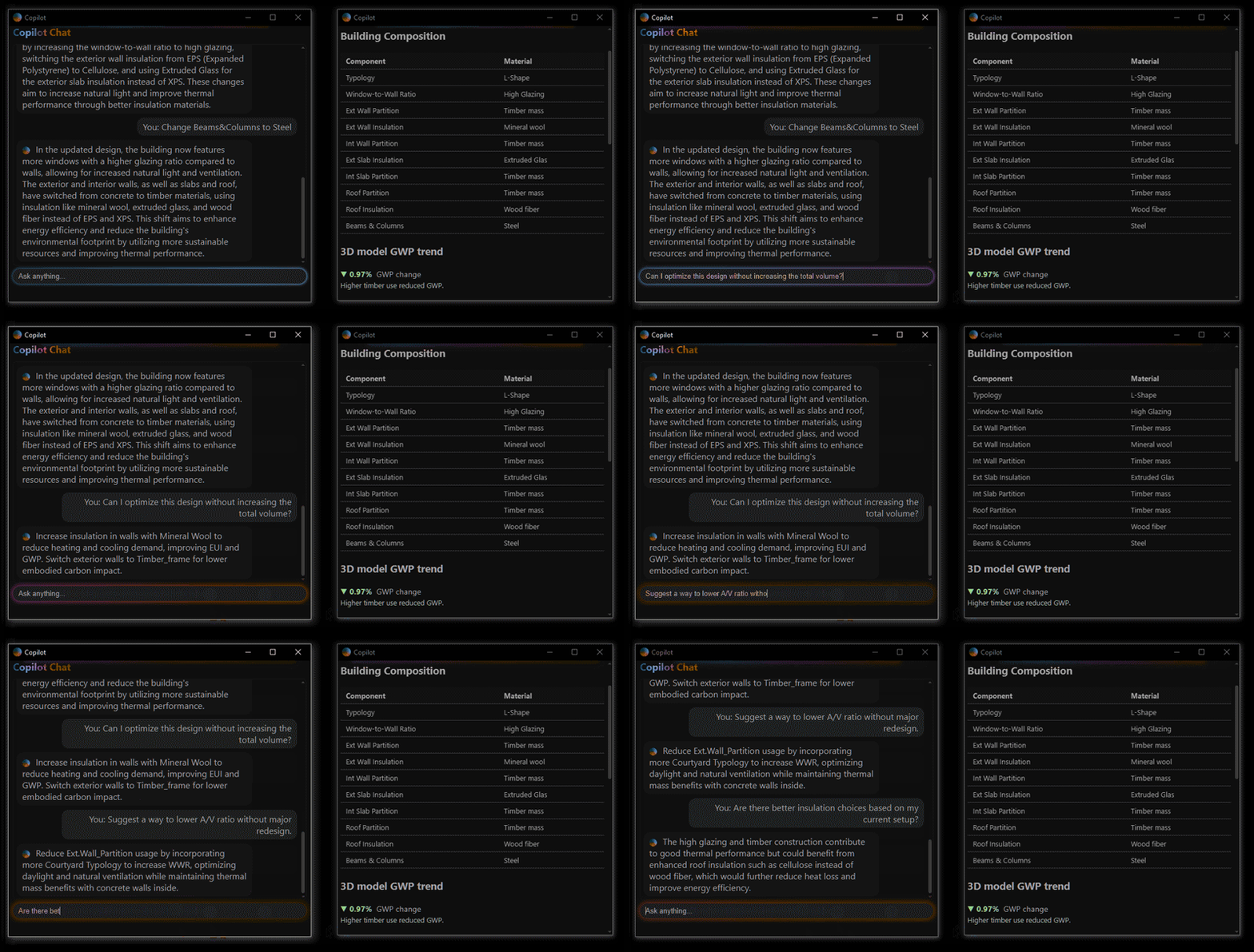
3) Seek suggestions (e.g., “How can I reduce operational energy without changing geometry?”)
4) Compare design options (e.g., “Which version has lower GWP?”)
3) Seek suggestions (e.g., “How can I reduce operational energy without changing geometry?”)
4) Compare design options (e.g., “Which version has lower GWP?”)
DATA TAB
The DATA tab displays live information to the user:
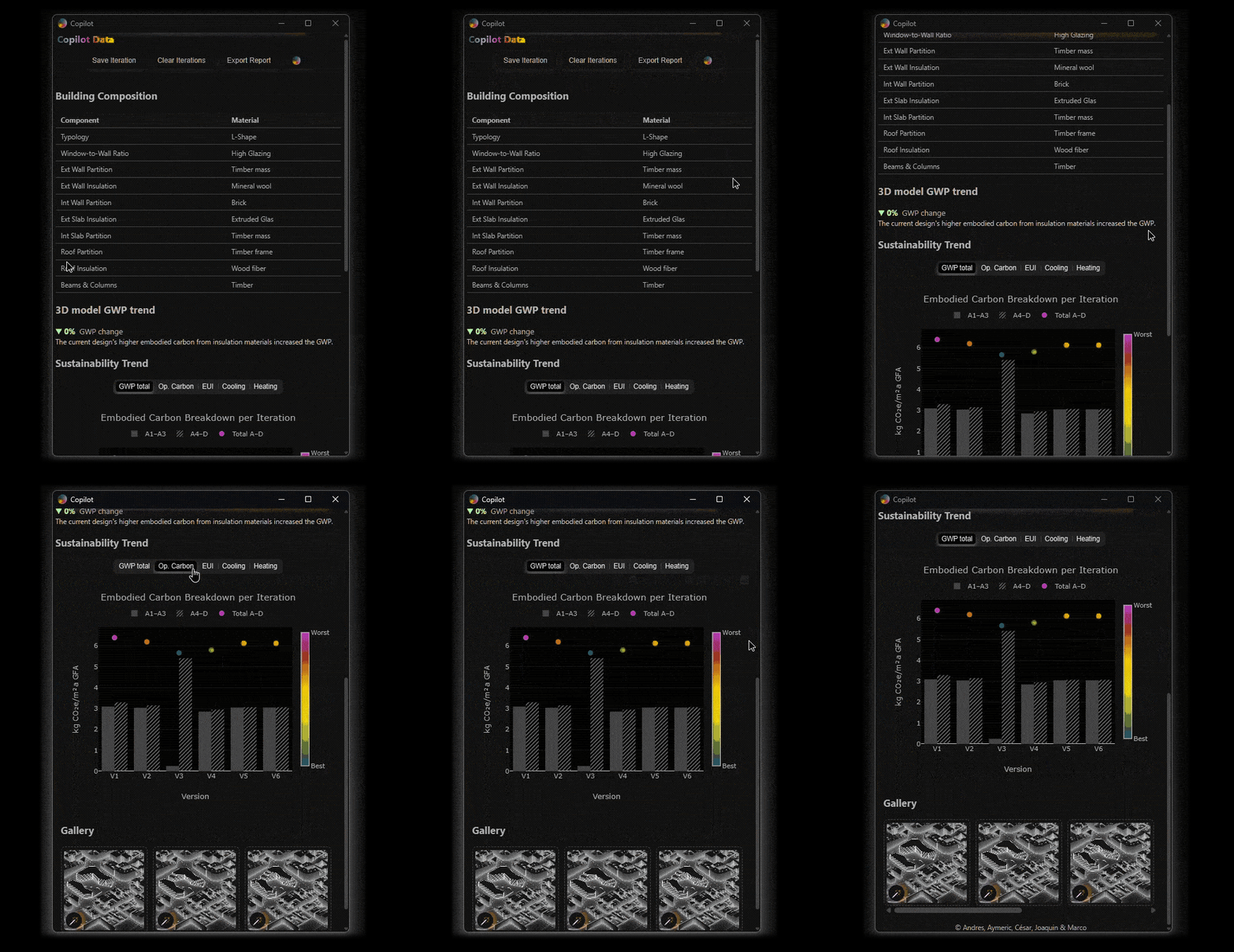
1) Actionable buttons allow to save iterations, clear them, export a report or open a WebApp
2) Material composition of the current iteration informs the user of the material layers used in the design
3) Both visual & text based explanation of GWP trends informs and makes the user aware of the GWP performance on each design step
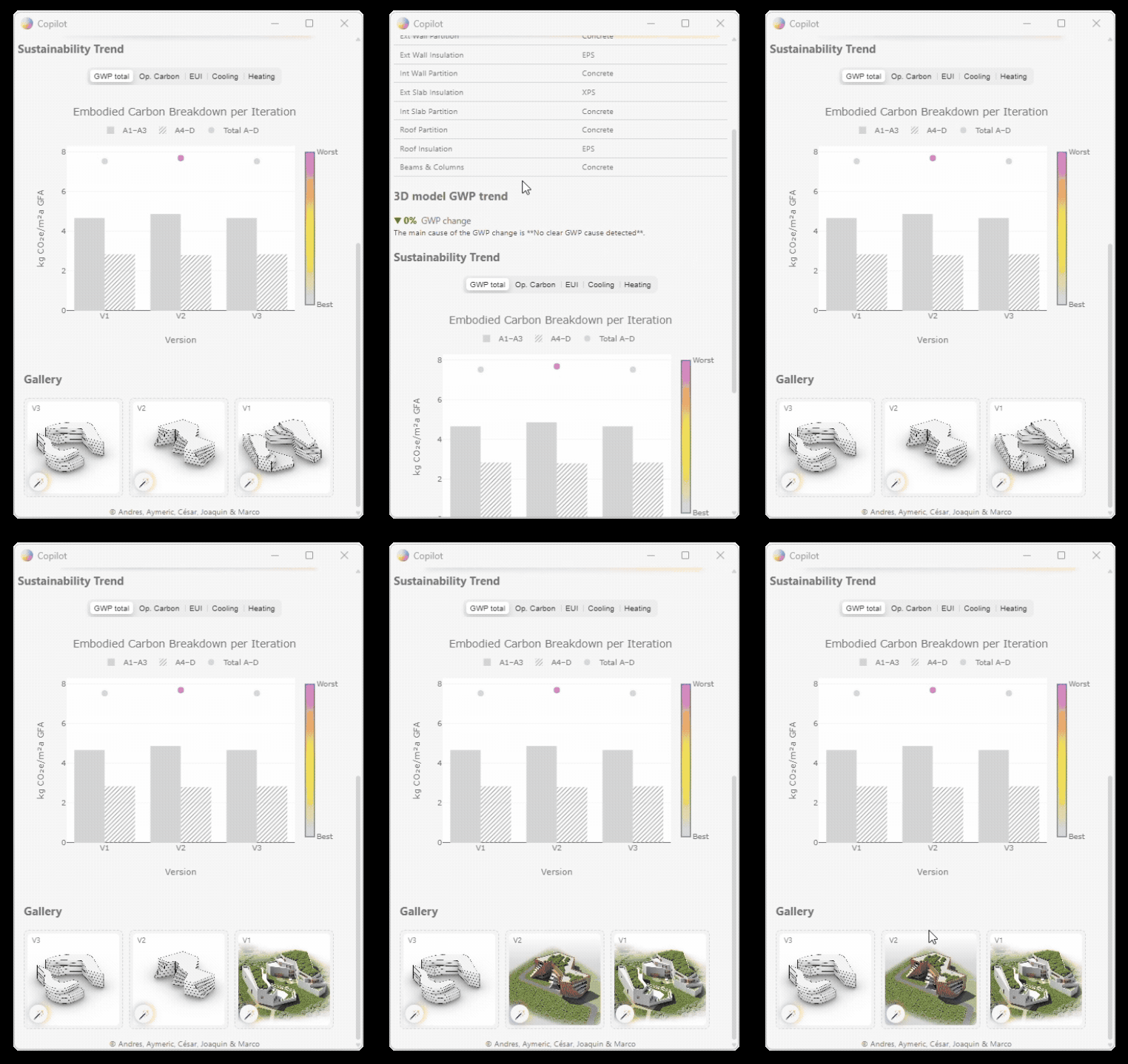
4) Plots for each saved iteration present more KPIs for assessment. GWP, operational carbon, and more, allowing a comparison of iterations in real time.
5) And, finally, a visual gallery at the end of the data tab
2) Material composition of the current iteration informs the user of the material layers used in the design
3) Both visual & text based explanation of GWP trends informs and makes the user aware of the GWP performance on each design step
4) Plots for each saved iteration present more KPIs for assessment. GWP, operational carbon, and more, allowing a comparison of iterations in real time.
5) And, finally, a visual gallery at the end of the data tab
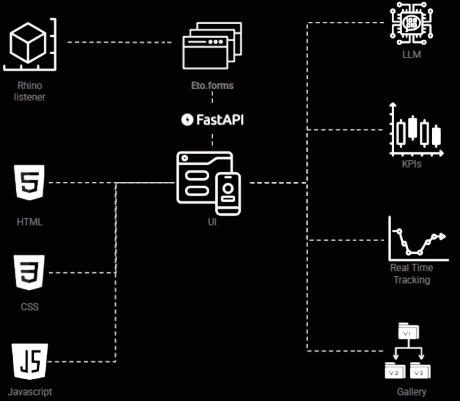
To enhance the user experience, the UI has been integrated into Rhino. A combination of Eto.form and different Web Design features have been implemented to ensure visual consistency and flexibility.
The interface, base for gAIa and user interactions, is a key aspect of the user experience and in the success of our copilot. Our iterative process to develop the UI made us try different type of interfaces, such as Gradio, full eto.form UI, full web UI. Ultimately, we leveraged the power eto.forms, natively integrated in Rhinoceros3D, with the felxibility of the webview. This enables the UI to be powerful, flexible, adaptable and a lot customizable than previous iteration.
In the backend, the rhino listener module communicates via Eto.form with the UI. HTML, CSS and Javascript enhance the User experience. The outcome is represented in a integrated LLM-Chat, KPIs displayed in plots and real time tracking, and finally a gallery of saved images or renders.

UNDER THE HOOD
ML
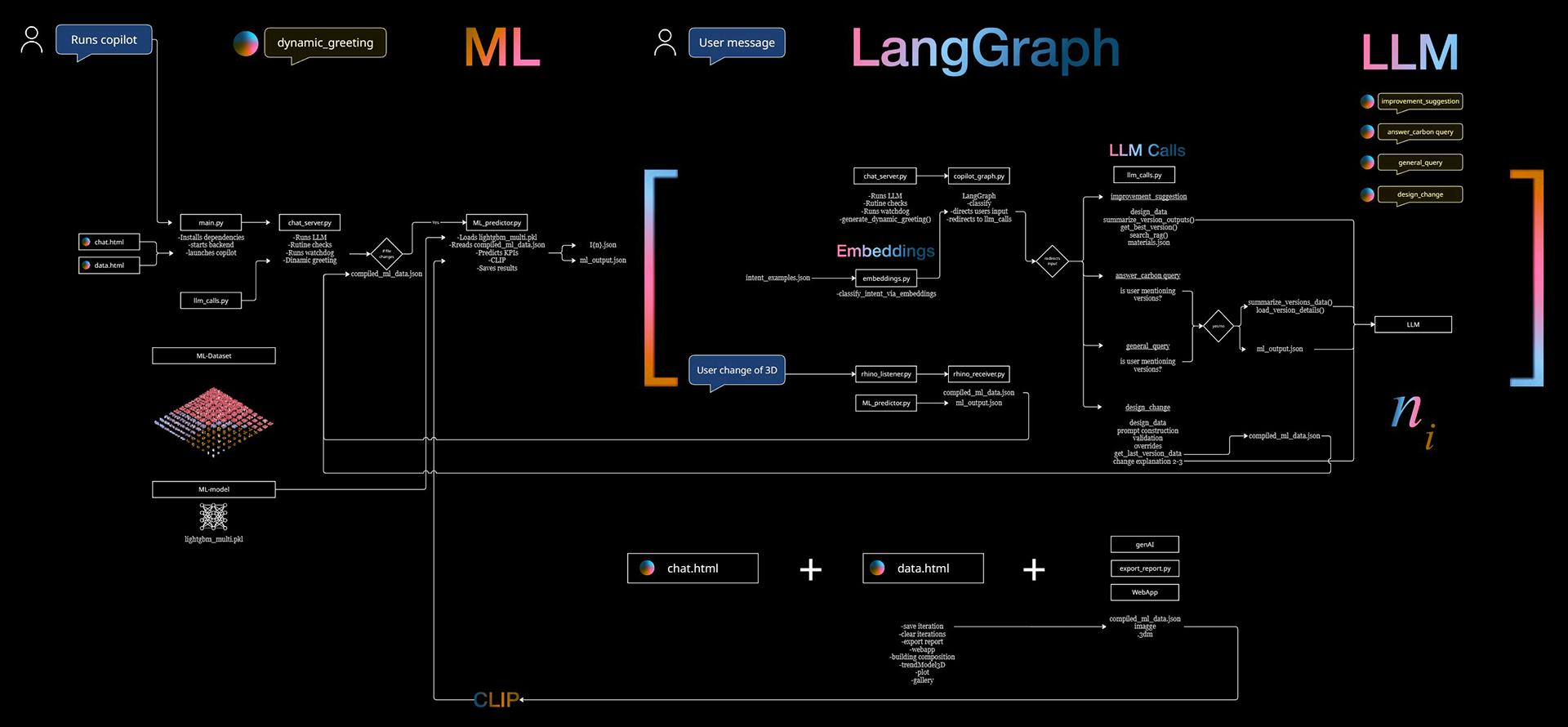
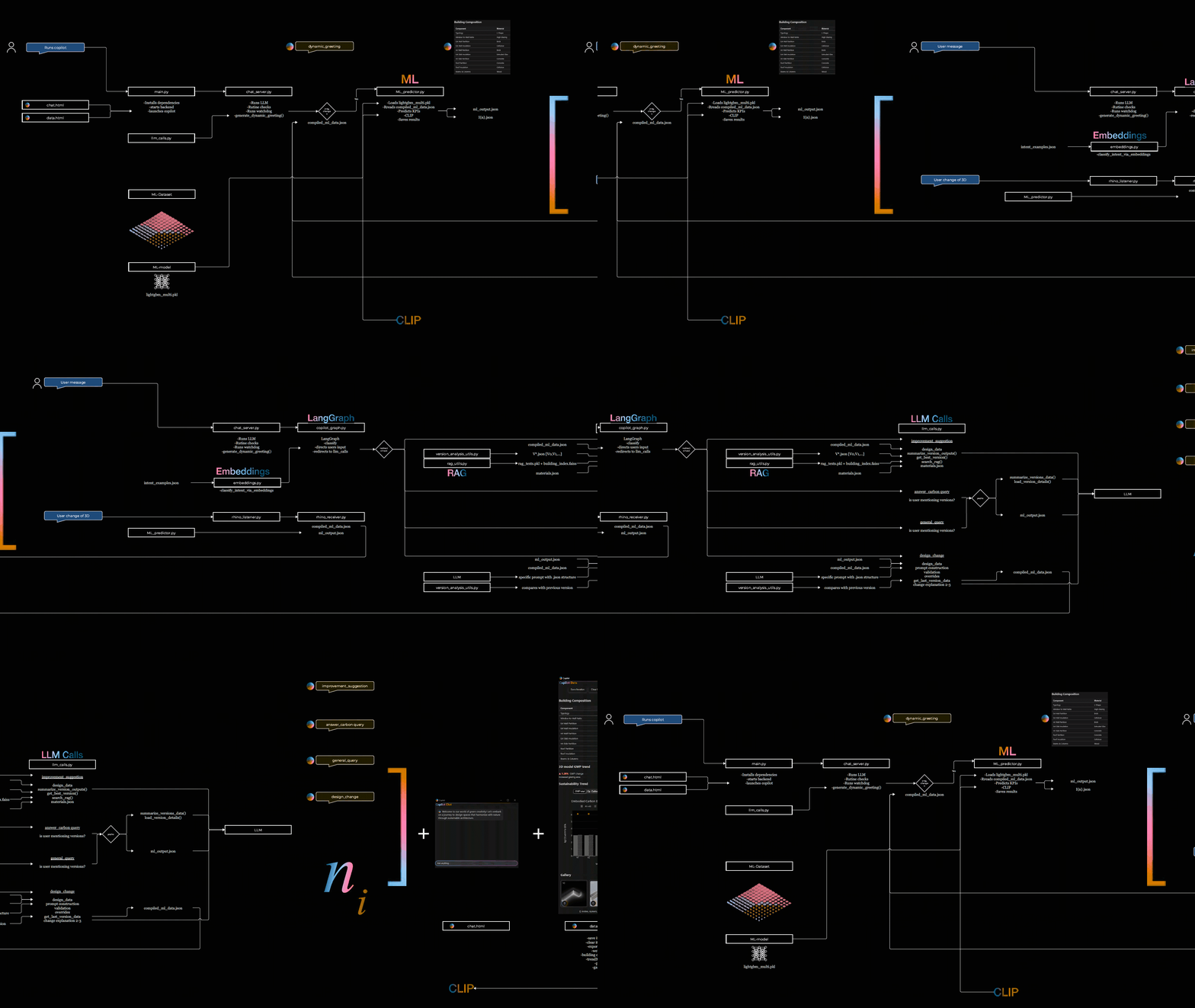
To avoid running complex simulations during every design change, gAIa uses a trained ML model. It combines Rhino geometry, a CLIP-derived typology signal extracted from a saved Rhino viewport snapshot (e.g., courtyard, block, L-shape), and materiality inputs from the chat, to predict energy (EUI, heating/cooling demand) and carbon (embodied/operational) metrics.
To avoid running complex simulations during every design change, gAIa uses a trained ML model. It combines Rhino geometry, a CLIP-derived typology signal extracted from a saved Rhino viewport snapshot (e.g., courtyard, block, L-shape), and materiality inputs from the chat, to predict energy (EUI, heating/cooling demand) and carbon (embodied/operational) metrics.
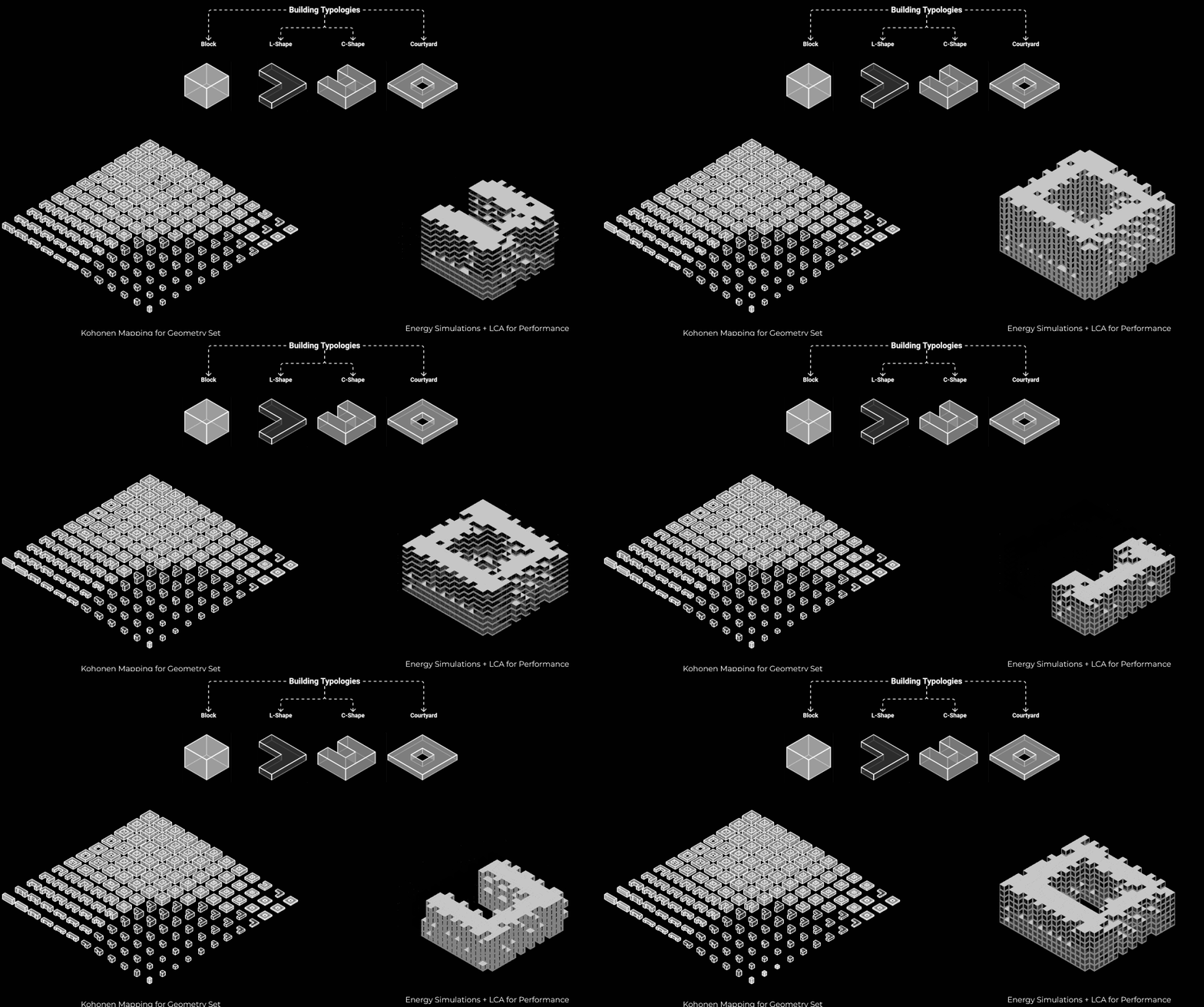
The model is trained on a dataset derived from geometries produced via Kohonen mapping to capture typological diversity. Energy simulations and LCA are then performed while varying material and energy-related characteristics, resulting in ~93,000 datapoints for training.
For more information about the training process visit the "CARBON AI" project.
THE LLM
We generated a robust embeddings database to represent query ideas as vectors. When a user inputs text, we first compare its vector representation with our database and then based on their comparison we classify it using a LangGraph, allowing a fast interaction with the user via the chat and connected to the ML-Model to display modifications in real time.
The LLM approach was thoroughly tested with different Models. For our specific case, Llama Tulu showed the most robust features.
We generated a robust embeddings database to represent query ideas as vectors. When a user inputs text, we first compare its vector representation with our database and then based on their comparison we classify it using a LangGraph, allowing a fast interaction with the user via the chat and connected to the ML-Model to display modifications in real time.
The LLM approach was thoroughly tested with different Models. For our specific case, Llama Tulu showed the most robust features.
CHANGES
The first method is responsible for responding to inputs related to changes in the model and subsequently providing feedback that clarifies the nature of these changes from a sustainable design perspective. This approach enables design decisions to be made with a clear understanding of their broader implications, going beyond mere alterations in materiality.
SUGGESTIONS
The second method analyzes the current design proposal and compares it, using RAG, with the best solutions sharing similar characteristics. This enables the system to provide guidance on potential improvements to the design. Through this approach, the LLM goes beyond the ideas proposed by the user, helping them arrive at the most optimal solution from a sustainable design perspective.
VERSIONING
This method is responsible for comparing different versions that the user has saved using the Save Iteration function. It enables a departure from a linear workflow, which often limits the ability to maintain a holistic view of the changes made throughout the design process.
GENERAL QUERIES
General Queries serves as the fallback category for user inputs whose intent scores fall below 0.67. It is designed to provide answers to general or ambiguous questions, while still incorporating specific design-related information whenever possible. This ensures that users receive meaningful guidance even when their queries lack precise context or clear intent classification.
We generated a robust embeddings database to represent query ideas as vectors. When a user inputs text, we first compare its vector representation with our
AI-POWERED PREVIEWS
In the interface, each saved iteration can trigger rendering via ComfyUI/ComfyAPI: clicking the “magic wand” combines the saved version's geometry with an automatic prompt (including specified materiality), and sends it to ComfyUI where the LoRA inference runs, returning a render aligned with collected data about the design.
For gAIa’s Copilot, we trained our own image-to-image LoRA so the tool can generate consistent architectural renders directly from simplified massing inputs. The LoRA was trained on a curated dataset of 45° satellite isometric building images, cleaned through background removal and tagged with typology-focused prompts (e.g., courtyard, L-/U-shaped, block).
In the interface, each saved iteration can trigger rendering via ComfyUI/ComfyAPI: clicking the “magic wand” combines the saved version's geometry with an automatic prompt (including specified materiality), and sends it to ComfyUI where the LoRA inference runs, returning a render aligned with collected data about the design.

NEXT STEPS
gAIa is currently a functional prototype, offering a foundation for AI-assisted sustainable design. However, its potential extends beyond its current scope. The next stages of development aim to enhance usability, expand coverage, and deepen integration across workflows:
Rhino Plugin Deployment
Transitioning Gaia from a research interface to a fully integrated Rhino plugin will improve accessibility and allow for smoother adoption in practice.
Transitioning Gaia from a research interface to a fully integrated Rhino plugin will improve accessibility and allow for smoother adoption in practice.
Support for Diverse Climate Contexts
Currently limited to one weather dataset, gAIa will expand to include multiple climate zones, enabling geographically responsive design strategies.
Currently limited to one weather dataset, gAIa will expand to include multiple climate zones, enabling geographically responsive design strategies.
Broader Typology and Geometry Recognition
Future iterations will support a wider range of building typologies and complex geometries, allowing Gaia to assist with more varied architectural programs.
Future iterations will support a wider range of building typologies and complex geometries, allowing Gaia to assist with more varied architectural programs.
Expanded Material and Component Libraries
Integrating more comprehensive environmental datasets will improve the accuracy of embodied carbon estimates and allow for finer-grained material comparisons.
Integrating more comprehensive environmental datasets will improve the accuracy of embodied carbon estimates and allow for finer-grained material comparisons.
Enhanced Retrieval-Augmented Generation (RAG)
By feeding Gaia more structured design documentation, codes, and certification criteria, the system will provide richer, more context-aware feedback to design queries.
By feeding Gaia more structured design documentation, codes, and certification criteria, the system will provide richer, more context-aware feedback to design queries.
Collaborative and Cloud-Based Features
Long-term development will explore shared workspaces, remote rendering, and multi-user feedback for teams working across disciplines or locations.
Long-term development will explore shared workspaces, remote rendering, and multi-user feedback for teams working across disciplines or locations.
Performance Optimization and Offline Use
Efforts are underway to improve computational efficiency and reduce dependence on cloud APIs, making gAIa more portable and responsive in local environments.
Efforts are underway to improve computational efficiency and reduce dependence on cloud APIs, making gAIa more portable and responsive in local environments.